Homelab
A Journey in Self-Hosting and Digital Independence
What Is a Homelab?
A homelab is essentially a personal data center running in your home. Instead of relying on big tech companies like Google, Apple, or Amazon to store photos, manage smart home devices, and sync files, I run my own servers that handle all of these tasks privately and under my complete control.
Why Self-Host?
I value my privacy, and I don't trust Google to respect it. So I've systematically replaced their services with alternatives I control: a NAS instead of Google Drive, Proton Mail instead of Gmail, Firefox instead of Chrome, Nextcloud for file sync, Kagi instead of Google Search. I use Linux because I feel the same way about Microsoft as I do about Google.
The value of self-hosting isn't just about privacy or avoiding subscription fees. It's about understanding. Every failure teaches more than any success. Every troubleshooting session deepens my knowledge of how systems actually work.
There's a tension between convenience and control. Google Photos just works. Setting up Immich took days, including a complete re-import when the first approach failed. But now I understand photo metadata, machine learning inference, PostgreSQL databases, Docker containers, NFS mounts, and reverse proxies in ways I never would have otherwise.
The Origin Story
My homelab journey actually began with a Raspberry Pi running Home Assistant. I wanted local control of my smart home devices without relying on cloud services. Soon after, I set up a second Raspberry Pi running Pi-hole for network-wide ad blocking. These two little single-board computers were my introduction to self-hosting.
But Raspberry Pis have a weakness: they run on SD cards, which have limited write cycles and can fail unexpectedly. After reading too many horror stories about corrupted SD cards taking down Home Assistant installations, I started researching more reliable alternatives. Could I run Home Assistant on an old desktop computer instead?
That research led me to discover Proxmox, a virtualization platform that could run multiple virtual machines on a single piece of hardware. I could run Home Assistant, Pi-hole, and other services all on one machine, with proper storage that wouldn't randomly corrupt. The Dell OptiPlex 990 sitting in my closet suddenly had a purpose.
What started as a search for reliability turned into a deep dive into enterprise networking concepts, Linux system administration, ZFS storage management, containerization with Docker, and virtualization. Every problem solved revealed two more interesting challenges.
The Hardware
My homelab has evolved from those Raspberry Pis into a distributed network of dedicated systems, each with a specific role:
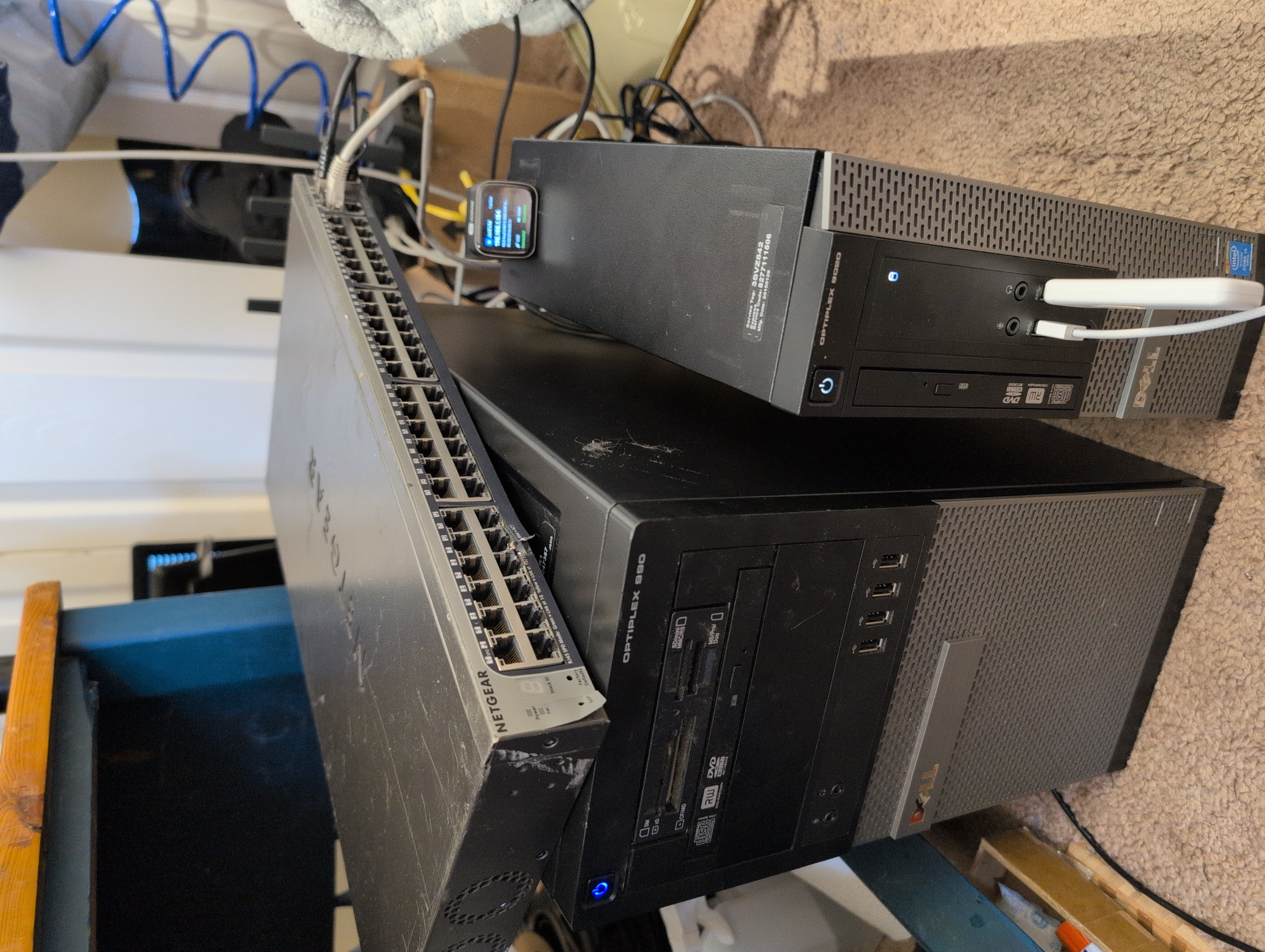
The Brain (Dell OptiPlex 9020)
With 32GB of RAM and a mix of SSD and HDD storage, this compact desktop runs Proxmox VE, a virtualization platform that lets me run multiple "virtual machines" on a single piece of hardware. It hosts my smart home controller, network-wide ad blocking, VPN access, application server, and system monitoring, all running simultaneously but isolated from each other.
The Storage Server (Dell OptiPlex 990)
With 32GB of RAM dedicated to ZFS caching and two 3TB HGST enterprise SAS drives in a mirrored configuration, this machine is dedicated to storing and protecting my data. It runs TrueNAS SCALE, specialized software for network-attached storage that provides the data to all my applications over NFS.
The enterprise drives replaced consumer drives that had started showing concerning SMART statistics. One had developed pending sectors and was running hot. The migration used ZFS's built-in resilver capability, replacing drives one at a time while maintaining pool availability.
The Backup Node (Acer Laptop)
A laptop with a broken screen runs headless (no monitor needed) as a secondary Proxmox node. Setting it up required creating an automated installation USB with answer files since I didn't want to drag out a monitor for a ten-minute install. It now runs a backup Pi-hole and Tailscale instance, providing resilience if the main host goes down.
The Network (GL-iNet MT6000 + Netgear S3300)
A GL-iNet MT6000 router running OpenWrt handles routing and firewall duties. A Netgear S3300-52X switch with 10GbE SFP+ ports is ready for high-speed backbone connectivity, though it's currently waiting for properly coded SFP cables (it rejects generic DAC cables with "Invalid cable type" errors due to strict vendor ID checking).
What It Does
Photo Management with Immich
Moving away from Google Photos was a major milestone. I found Google's search feature incredibly useful for finding photos in my disorganized collection, and I was skeptical that any self-hosted solution would match it. I was pleasantly surprised by Immich's AI-powered search capabilities.
The migration itself was an adventure. I downloaded a 100GB Google Takeout export (50 zip files of 2GB each) directly to my NAS. The initial import using Immich's official CLI tool resulted in incorrect date metadata for over 20,000 images. I had to discover immich-go, a community tool specifically designed for Google Takeout imports, and re-import everything from scratch overnight.
Today, Immich manages over 18,600 photos and videos. The machine learning service provides face recognition, object detection, and smart search, running entirely on my own hardware.
File Sync with Nextcloud
Nextcloud serves as my personal Dropbox or Google Drive. I can access my files from anywhere, share folders with family, and sync documents across all my devices, without a monthly subscription or corporate data mining.
Setting it up wasn't straightforward. Performance optimization required configuring trusted proxies for proper header handling, setting up SMTP for notifications, and installing the AppAPI deploy daemon for external apps functionality.
Document Management with Paperless-ngx
Paperless-ngx processes every receipt, bill, and important document I scan, running OCR (text recognition) and organizing them automatically. I can search through years of paperwork in seconds.
The installation encountered disk space issues when Docker's storage filled the OS disk completely, requiring relocation of Docker's data directory to ZFS storage. I've set up automated ingestion from my downloads folder, allowing documents to flow into the system automatically for processing.
Smart Home with Home Assistant
I purposely use Zigbee and Z-Wave for most smart home devices because I don't want to be reliant on WiFi. The smart home works even if WiFi goes down, and these protocols are more secure than WiFi-based IoT devices. The Zigbee coordinator and Z-Wave controller are passed through from the Proxmox host via USB, allowing Home Assistant direct access to the radio hardware.
I built custom multi-sensors using ESP32 devices and ESPHome firmware, learning YAML configuration and the intricacies of managing IoT devices at the firmware level. Zigbee IR blasters control devices without smart capabilities, like bedroom fans and TVs.
Network-Wide Ad Blocking with Pi-hole
Pi-hole provides DNS-level ad blocking and tracking prevention for every device on the network. For redundancy, a backup Pi-hole on the secondary Proxmox node syncs every five minutes. This ensures that even if my main host goes down, DNS resolution continues and internet access remains available.
Monitoring with Grafana
Custom dashboards show everything happening across my systems in real-time: CPU usage, network traffic, storage capacity, and more. InfluxDB stores the time-series data for historical analysis.
The Network Architecture
The network is segmented into five VLANs (Virtual LANs), essentially separate networks with carefully controlled access between them. There's no point in having network separation if you just forward all traffic. Instead, specific firewall rules allow only necessary cross-VLAN communication.
- Management (VLAN 1) - Servers and infrastructure, the most trusted zone
- Trusted (VLAN 10) - Personal devices like laptops, phones, and 3D printers
- IoT-Isolated (VLAN 20) - Smart devices that need no internet access, completely air-gapped from the outside world
- IoT-Cloud (VLAN 30) - Smart devices that require internet (like the Roomba or air purifiers), with firewall rules blocking access to internal resources
- Guest (VLAN 40) - Visitor Wi-Fi with no access to internal resources
This segmentation means that even if a cheap IoT device gets compromised, it can't reach my personal files or critical infrastructure. DNS queries are forced through Pi-hole with firewall rules that block direct DNS bypass attempts.
The CGNAT Challenge
Early in the journey, I faced a significant constraint: T-Mobile 5G home internet. While it provided decent speeds, it came with carrier-grade NAT (CGNAT), which meant no static IP address and no port forwarding. For a homelab that would need to be accessed remotely, this was a fundamental problem.
The solution came in the form of Tailscale, a mesh VPN service that can tunnel through CGNAT. I set up a small VPS running Caddy as a reverse proxy. Traffic from my domain routes through the VPS, through a Tailscale tunnel, to my home network. While I wasn't thrilled about the complexity, it works reliably and taught me invaluable lessons about networking, DNS, SSL certificates, and security architecture.
Project Journals
TrueNAS Migration (January 2026)
A major infrastructure project that transformed my dual-purpose Proxmox server into a dedicated TrueNAS storage appliance while migrating all virtual machines to a separate hypervisor. The week-long journey included careful planning, an incident that destroyed a disk due to a misunderstood command, a successful recovery, and valuable lessons learned.
Lessons Learned
- Always use verbose mode. When creating archives of critical data, always use
tar -vto see what's being captured. Silent failures are the worst kind. - Understand your tools. Commands can have unexpected effects.
qm set --delete unused0doesn't just remove a reference when the storage backend is ZFS; it destroys the actual data. - Enterprise hardware is worth it. Consumer drives fail; enterprise SAS drives from decommissioned data centers are affordable and built to last.
- Backups aren't optional. The 3-2-1 rule exists for a reason: three copies, two different media types, one offsite.
- Network segmentation actually matters. It's not paranoia when IoT devices really do phone home constantly.
- Documentation is for future-you. I keep detailed notes because six months from now, I won't remember why I configured something a particular way.
- Verify, don't assume. "Trust but verify" should be "Verify, then trust, then verify again."
What's Next
The homelab is never really "done." It grows and evolves as I learn new things and my needs change. Here's what's on the horizon:
Getting Organized: A Proper Server Rack
Right now, the hardware lives in what I diplomatically call a "functional arrangement" of machines, cables, and network switches. A proper server rack (18-22U, four-post, open-frame due to budget constraints) will bring order to the chaos with proper cable management, better airflow, and room to grow.
Building a True Cluster
Currently, if I need to take down my main server for maintenance, everything running on it goes offline. The solution is a Proxmox cluster where multiple physical machines work together as a single system. Virtual machines can automatically migrate from one node to another, meaning I can update hardware or reboot a server without any service interruption.
I'm planning to acquire a few mini PCs (compact, energy-efficient computers about the size of a paperback book) to serve as additional cluster nodes. My workplace periodically retires equipment that's still perfectly capable for homelab use, so I may be able to give some hardware a second life.
Self-Hosted Video Surveillance with Frigate
Frigate is an open-source network video recorder that runs AI-powered object detection locally. It can tell the difference between a person, a car, and a cat, and only alert when something actually matters. No cloud subscriptions, no footage stored on someone else's servers, and no monthly fees.
Proper UPS Integration
A rack-mount UPS with NUT (Network UPS Tools) integration would enable automated graceful shutdowns during extended power outages, protecting against data corruption.
Final Thoughts
Building a homelab is never really complete. There's always another service to deploy, another optimization to make, another failure to recover from. But that's part of the appeal. Each challenge is an opportunity to learn something new.
For anyone considering this path: expect frustration, expect failures, expect to spend far more time than you anticipated on problems that seem like they should be simple. But also expect a deep satisfaction when everything works, when your photos sync automatically to your own server, when your smart home responds instantly without internet access, when your files are yours and no corporation can hold them hostage.
Digital independence isn't free, and it's not easy. But it's worth it.